
You know the pain. You’ve written an amazing blog post, designed a beautiful website, or prepped a killer social media campaign. All you need is the perfect image. And so begins the descent into madness: scrolling through endless pages of cheesy, fake-smiling models in sterile boardrooms or the same tired “lightbulb for an idea” shot. It’s a soul-crushing waste of time. I was so sick of my content looking generic. Then I found StocksBreeze. I rolled my eyes, expecting more of the same, but the promise of AI-powered search made my inner geek curious enough to click. And thank goodness I did.
Key Takeaways
- Finds the Unfindable: The AI search understands natural language and concepts, not just keywords, helping you find the exact vibe you have in your head in seconds.
- Kills the Cringe: The library is curated to feel authentic and modern, actively avoiding the cheesy, overused photos that plague other sites.
- All-in-One Asset Hub: It’s not just photos. You get access to vectors, illustrations, and video clips under one simple, ridiculously clear license.
Quick Verdict
- Best For: Bloggers, content creators, social media managers, and small businesses who value aesthetics.
- Top Feature: The AI-powered “Concept Search” that actually gets what you’re looking for.
- Rating: 4.8/5
Okay, But What Makes It Different From Any Other Stock Site?
I get it. A stock photo site is a stock photo site. But you’re wrong. Most sites rely on user-generated tags, which are often terrible. You search for “teamwork” and you get a pyramid of hands. Ugh. StocksBreeze uses an AI to analyze the *content and mood* of the image itself. This means you can search for things like “a serene minimalist workspace with natural light” instead of just “desk.”
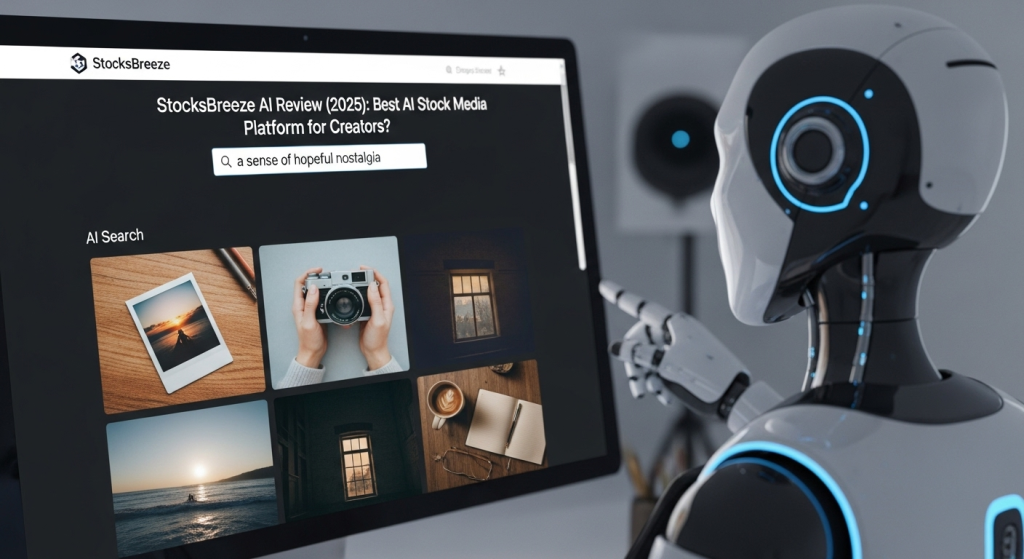
My first test was to throw it a curveball. I searched for “a sense of hopeful nostalgia.” A normal site would just give up. StocksBreeze returned images of vintage film cameras, sun-drenched polaroids, and people looking at old photo albums. It *understood the feeling*. That’s when I knew this was a completely different beast. It wasn’t just a library; it was a creative partner.
The Features That Will Actually Change Your Workflow
This thing is packed with smart tools that genuinely save you from creative burnout. Here are the ones I can’t live without now:
- AI Concept Search: As I said, this is the star. You type in a vibe, a feeling, or a complex idea, and it brings back relevant, artistic results. It’s magic.
- “More Like This” That Doesn’t Suck: When you find an image you like, the “more like this” button actually works. It analyzes the composition, color palette, and subject to find visually similar images, not just ones with the same keyword.
- Simple, All-Encompassing License: You don’t need a law degree to figure out how you can use the images. Everything falls under one clear, royalty-free commercial license. No more worrying about usage rights.
Putting It To The Test: Real-World Scenarios
Features are nice, but how does it work in the real world? Let me break it down.
- The Impossible Blog Post Image: I wrote a post about the “loneliness of remote work.” What do you even search for? Instead of cheesy photos of sad people with laptops, I searched StocksBreeze for “quiet solitude” and found a stunning, atmospheric shot of a single lit window in a dark building. It was perfect, evocative, and took me 30 seconds to find.
- Creating a Cohesive Instagram Feed: I found a photo with a color palette I loved. Using the “More Like This” feature, I was able to find a dozen other images with a similar aesthetic and mood, letting me plan out a whole week of visually consistent content in about ten minutes.
- Finding That *One* Specific Vector: I needed a simple, line-art illustration of a coffee plant for a logo concept. Instead of wading through clip art hell, I typed in “minimalist coffee plant vector” and got exactly what I needed on the first try.
What ‘Jobs’ Can You Hire StocksBreeze For?
I’ve started thinking about this tool as a member of my creative team. Here are the jobs I’ve “hired” it for:
- Being My Visual Brainstorming Partner: When I’m stuck for an idea, I just start searching for abstract concepts and see what it sparks.
- Serving as My On-Demand Art Director: It helps me establish a mood and find a consistent aesthetic for any project instantly.
- Eliminating Copyright Anxiety: Its job is to provide me with a library of assets I can use for anything, commercially, without a second thought.
- Finding a Needle in a Haystack: Its primary role is to perform the impossible task of finding that one perfect image I’ve pictured in my mind.
My Journey From Stock Photo Hater to AI Believer
My creative process used to hit a brick wall right at the end. I’d have the words or the design, but the visuals felt like a compromise. It was a constant source of frustration. When I first signed up for the StocksBreeze trial, I was deeply cynical. I was ready to cancel. My ‘Aha!’ moment was that “hopeful nostalgia” search. It was so small, but it was profound. It proved that the AI wasn’t just matching keywords; it was interpreting intent. The new reality is that finding visuals is now the most exciting part of my process. I can think of a wild idea for a social post and know, with confidence, that I can find a unique, compelling image to bring it to life in minutes. It’s not an exaggeration to say it has saved me dozens of hours and made my work infinitely better.
The Good, The Bad, and The Beautiful
It’s amazing, but not a magical unicorn. Here’s the real deal.
The Good Stuff
- ✔️ The AI Search is a Game-Changer: I can’t say it enough. It just works. It saves so much time and frustration.
- ✔️ High-Quality, Authentic Library: The images feel modern and genuine. It’s clear they curate for quality over sheer quantity.
- ✔️ Stupidly Simple Licensing: The peace of mind from their universal commercial license is worth the price alone.
What I’d Change
- ❌ Library Size Isn’t Infinite: While the quality is high, it doesn’t have the sheer volume of a Shutterstock. For super-niche industrial or technical shots, you *might* strike out.
- ❌ Video Section is Still Growing: The photo and illustration libraries are top-notch. The video library is good and growing, but it’s not as comprehensive just yet.
Who Is This ACTUALLY For?
- You, The Content Creator / Blogger: You need high-quality, unique images daily and don’t have time to waste. This will be your secret weapon.
- You, The Small Business Owner: You want your brand to look polished and professional across your website and social media without hiring a photographer for every little thing. This is for you.
While I found it to be a beast for finding stunning hero images, blog visuals, and social media graphics, it might not be the best fit if you’re a major publication that needs very specific, event-based photojournalism (like a photo of a specific politician at a specific event yesterday). It excels at conceptual, evergreen assets.
- But, You’ll Probably Hate It If…: You need an absolutely massive, all-encompassing library with millions of obscure options and don’t care about aesthetic curation. In that case, a bigger, older library might be your jam.
Your Burning Questions, Answered
I get it, you’re skeptical. I was too. Here are the answers you’re looking for.
How much does StocksBreeze cost?
Their pricing is super straightforward. It’s a subscription model, starting around $29/month for a generous number of downloads. It’s way more affordable than buying images one by one.
Are the images on StocksBreeze royalty-free?
Yes! This is a huge deal. Everything you download comes with a standard commercial license, so you can use it for your business, marketing, and social media without extra fees or worries.
Can I use the images for commercial use?
Absolutely. That’s what it’s for. Blog posts, ads, websites, social media, presentations—you’re covered.
How is StocksBreeze better than a free site like Unsplash?
Free sites are great, but the selection is limited and everyone uses the same photos. StocksBreeze offers a much larger, more diverse library. Plus, its AI search is miles ahead, and the clear commercial license gives you legal protection that free sites often don’t.
Does StocksBreeze have an AI image generator?
As of my last check, their main focus is on the curated library of real photos and assets, but they are integrating more AI features, so this could be on the roadmap! Their strength is in search, not generation.
Is there a free trial?
Yes, they offer a free trial that gives you a set number of downloads so you can test out the quality of the assets and the power of the AI search for yourself. It’s a great way to see if it fits your workflow.
What kind of assets does it have besides photos?
They have a solid collection of high-quality vectors, illustrations, icons, and a growing library of video clips.
What if I cancel my subscription?
Any images you download during your subscription are yours to use forever under the license terms. You just won’t be able to download new ones.
StocksBreeze vs Shutterstock?
Shutterstock has a bigger library, but StocksBreeze is better curated for authentic, non-cheesy content and has far superior search technology. It’s quality over quantity.
Do I have to credit the photographer?
No, attribution is not required for commercial use, which is a huge time-saver for businesses and creators.
The Final Verdict: Should You Switch?
If you’re a creator of any kind, your time is valuable. Wasting it scrolling through mediocre photos is painful. StocksBreeze gives you that time back and elevates the quality of your work. It makes the process of finding the right visual fun and inspiring instead of a chore. The feeling of typing a complex idea into a search bar and getting the perfect image back on the first try is, frankly, addicting.
Stop settling for generic. Stop wasting hours. Give the AI a chance to wow you. You won’t regret it.
How Does It Compare to the Competition?
StocksBreeze is amazing, but it’s not the only fish in the sea. Here’s my honest take on how it stacks up against the other big names you’re probably considering.
| Alternative | Best For | Key Feature Difference | Starting Price |
|---|---|---|---|
| Shutterstock | Big agencies that need the largest library on Earth, no matter what. If you need a photo of a specific bolt from a 1982 machine, they have it. | The main difference is its sheer, mind-boggling size. The search isn’t as smart as StocksBreeze, so you’ll do more digging. | Plans start around $29/mo for only 10 images, so it’s a bit pricier for the same number of assets. |
| Adobe Stock | If you’re already living and breathing in the Adobe Creative Cloud (Photoshop, Illustrator, etc.). | Its killer feature is the seamless integration. You can search and license images right inside Photoshop, which is pretty slick. | Starts at $29.99/mo for 10 assets. It’s directly competitive with StocksBreeze on price. |
| Canva Pro | People who need an all-in-one design tool, not just the assets. If you want templates and an editor, Canva is king. | Canva is a design tool first, asset library second. StocksBreeze is a specialized asset library with better search for finding unique images. | Around $119/year for a solo user, which includes the whole design tool. It’s an incredible value, honestly. |
| Unsplash | Hobbyists or anyone on a shoestring budget who needs pretty, artistic photos and is willing to search for them. | It’s free! But the license can be ambiguous for commercial use, and the library is much, much smaller and less diverse. | It costs you $0, but you pay with your time and by taking a risk on the licensing. |
| Getty Images | Major media corporations and brands who need exclusive, rights-managed images of celebrities and world events. | Getty is the super-premium, high-end option. The main difference is exclusivity and the price tag that comes with it. | It’s sold per-image and can be hundreds or even thousands of dollars for a single photo. Not for the faint of heart. |
